Sonasetu - Retailer
The Sonasetu Retailer Console is the merchant-facing side of the Sonasetu platform a dedicated dashboard that allows local jewellery shop owners to manage their shop portfolio, handle incoming booking requests from customers, and track sales generated through the platform.
Role
Product Design
Industry
Ecommerce
Duration
2 months

Step 1. Overview & problem statement
The challenge
The retailers this product was built for are local jewellery shop owners from tier one and tier two cities in India many of whom have little to no prior experience with digital tools or technology platforms. Designing a dashboard for this audience meant throwing out every assumption that comes with designing for tech-savvy users. The interface had to be immediately understandable to someone picking up a digital product management tool for the very first time.My role
Led the complete UX research and dashboard design for the retailer side from on-ground research with local retailers in Lucknow to final UI handoff..Stage 2. Research & design strategy
Research
I connected with local jewellery retailers through calls facilitated by the founders, who had existing relationships with shop owners in the region. These conversations gave direct access to how retailers currently managed their shops, how they tracked customers, and what their day-to-day workflow actually looked like. The founders' network made it possible to get honest, ground-level insight without the barrier of cold outreach and that context shaped every decision that followed in the design.What the research revealed
Retailers were unfamiliar with dashboards and data-heavy interfaces too much information on a single screen caused immediate confusion and disengagement.
Most communication with customers happened verbally or over WhatsApp the booking management system had to feel as simple and familiar as that.
Shop owners cared most about three things: how many bookings they had, who was coming, and what was selling everything else was secondary.Language and iconography mattered as much as layout labels needed to be plain, direct, and free of any technical terminology.
Design strategy
The strategy was built around radical simplicity design for the least digitally experienced retailer in the room, and the rest will follow. Prioritise the three core actions they care about most, keep the layout uncluttered, and use visual cues over text wherever possible to guide them through the interface.
Stage 3. Flows, wireframes & system design
Defining the flows
Before any visual design, I mapped the complete retailer journey onboarding their shop, uploading portfolio items, receiving and managing booking requests, and reviewing sales activity. Each flow was stripped to its absolute minimum steps, removing anything that wasn't directly necessary for the retailer to complete their task.Wireframing for a non-tech audience
Wireframes were approached differently here than a typical dashboard project. Every layout decision was tested against one standard: could a shop owner who has never used a software product before understand what to do on this screen without being told? Navigation was kept flat and visible, actions were large and clearly labelled, and the information hierarchy was built around what retailers checked first bookings, then portfolio, then sales.Design system
Built a complete design system tailored for the retailer console with a clean, high-contrast visual language, large touch targets, simplified iconography, and a type system that prioritised legibility above all else. The system was designed to scale as the product grew without ever adding complexity to the retailer's experience.
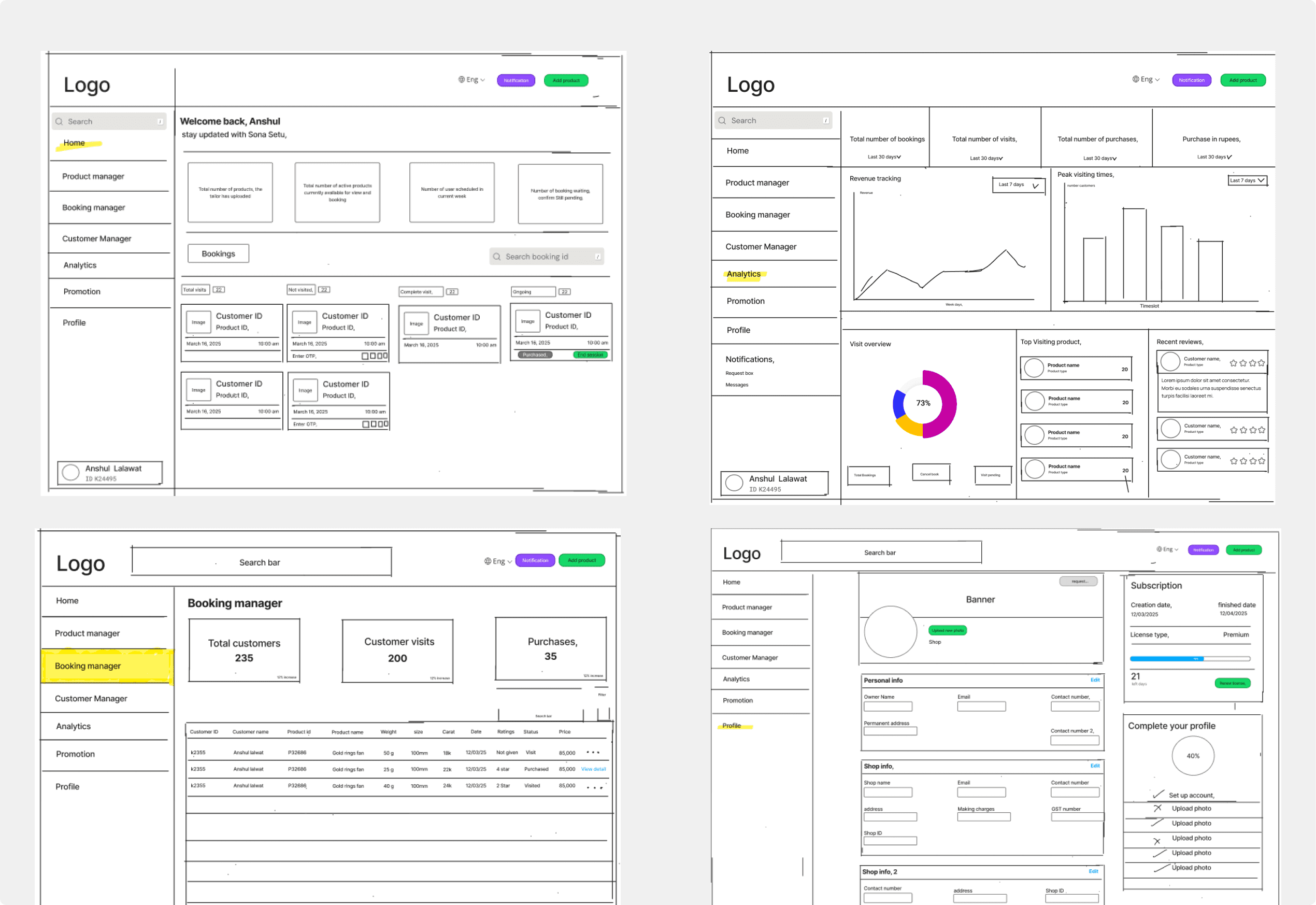
Stage 4. UI design & refinement
The dashboard UI
The final UI was built around three primary modules portfolio management, booking management, and sales overview. The home screen surfaced the most critical information immediately: today's bookings, pending requests, and a quick portfolio status. Nothing required drilling through multiple layers to find. Every primary action was reachable within two taps from anywhere in the dashboard.Designing for low digital literacy
Every screen went through an additional layer of review specifically for clarity — checking that icons were universally understood, that button labels left no room for misinterpretation, and that error or empty states guided the retailer to the right action rather than leaving them stuck. The interface had to work as its own instruction manual.
Stage 5. Handoff & reflection
Handoff
The retailer console was successfully designed and handed off a complete dashboard that local jewellery shop owners could use to manage their portfolio, track bookings, and monitor sales without prior experience with digital tools. The on-ground research from Lucknow gave the product a foundation that most B2B dashboards in this space completely overlook a genuine understanding of the person sitting behind the screen.What I learned
Designing for low digital literacy is one of the most demanding UX challenges there is not because the problems are complex, but because the margin for confusion is zero. Every assumption about what a user "should" understand has to be discarded and replaced with direct observation. This project pushed me to design with far greater precision and empathy than most projects demand.Key takeaway
The best dashboard for a non-technical user isn't a simplified version of a complex one. It's a completely different product built from the ground up around what they actually need to do, not what a system needs to show.


Outcomes
Focused on the business value The console gave Sonasetu's retail partners something they had never had before visibility into their own business performance through a digital lens. Bookings, portfolio reach, and sales activity were now trackable in one place, giving shop owners the confidence to grow their presence on the platform and engage more actively with incoming customers.
More projects

Sonasetu - Retailer
Retailer Dashboard is a centralized management platform that enables retailers to handle bookings, manage their shop operations, and maintain their online storefront portfolio seamlessly.
Client
Saurabh Verma
Date
Apr 9, 2026


Bhavishyaan
Bhavishyann is a student-focused platform that helps individuals manage academic stress and gain clarity about their career direction through guided assessments and insights.
Client
Shiksha Bhavishyaan
Date
May 3, 2025

More projects
Sonasetu - Retailer
Retailer Dashboard is a centralized management platform that enables retailers to handle bookings, manage their shop operations, and maintain their online storefront portfolio seamlessly.
Client
Saurabh Verma
Date
Apr 9, 2026
Bhavishyaan
Bhavishyann is a student-focused platform that helps individuals manage academic stress and gain clarity about their career direction through guided assessments and insights.
Client
Shiksha Bhavishyaan
Date
May 3, 2025
More projects
Sonasetu - Retailer
Retailer Dashboard is a centralized management platform that enables retailers to handle bookings, manage their shop operations, and maintain their online storefront portfolio seamlessly.
Client
Saurabh Verma
Date
Apr 9, 2026
Bhavishyaan
Bhavishyann is a student-focused platform that helps individuals manage academic stress and gain clarity about their career direction through guided assessments and insights.
Client
Shiksha Bhavishyaan
Date
May 3, 2025